> ## Documentation Index
> Fetch the complete documentation index at: https://bytebeam.io/docs/llms.txt
> Use this file to discover all available pages before exploring further.
# Editing a DBC Parser
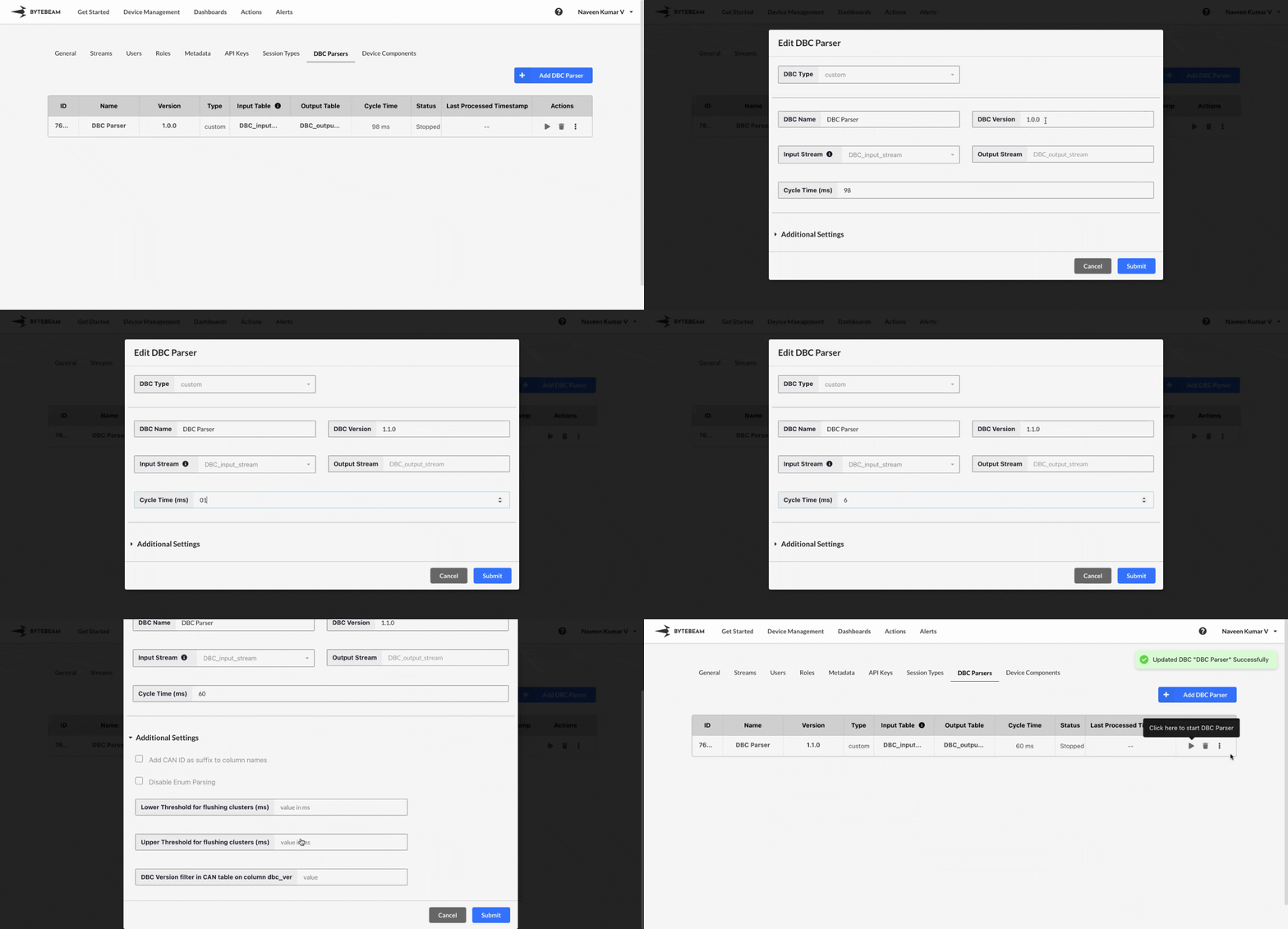
To edit the existing DBC parser in Bytebeam console,
Navigate to the **Settings Tab** by clicking on your username at the top right
Navigate to the **DBC Parsers** tab, click on the 3 dots against the DBC parser and click on View/Edit DBC Parser option
Change the existing details of the fields like DBC Name, DBC Version etc. and click on **Submit** button to edit it.
You can only change values of fields like DBC Name, DBC Version, Cycle Time, Lower Threshold for flushing clusters (ms), Upper Threshold for flushing clusters (ms), DBC Version filter in CAN table on column dbc\_ver while editing any DBC Parser.
Hover over the DBC name to view its ID and name in the tooltip. Click on the name to copy both to the clipboard.