> ## Documentation Index
> Fetch the complete documentation index at: https://bytebeam.io/docs/llms.txt
> Use this file to discover all available pages before exploring further.
# Updating a DBC Parser
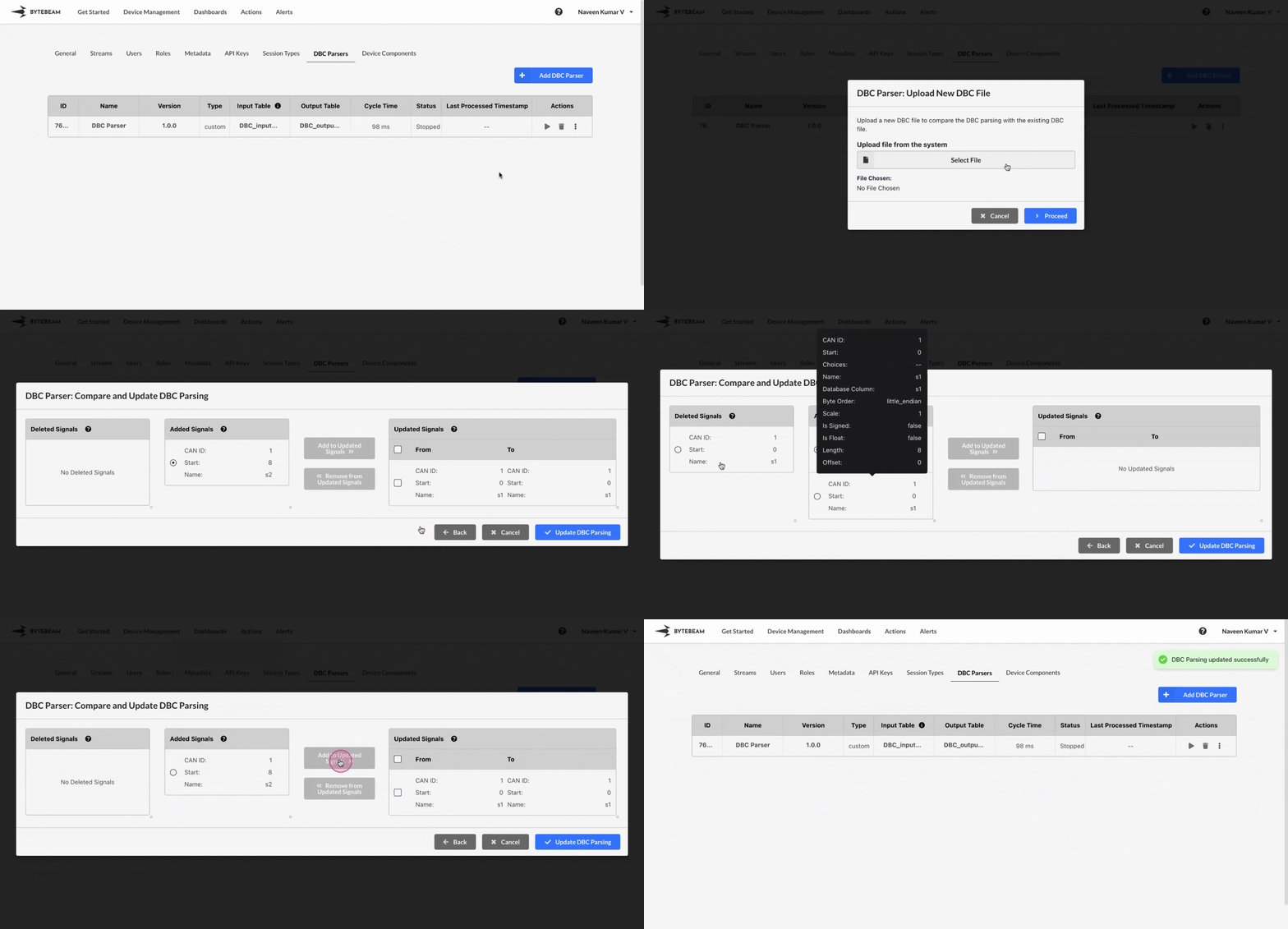
To update the existing DBC parser in Bytebeam console,
Navigate to the **Settings Tab** by clicking on your username at the top right
Navigate to the **DBC Parsers** tab, click on the 3 dots against the DBC parser and click on Update DBC Parsing option
Choose the new DBC file to upload, verify the changes in the Compare DBC modal and click on **Update DBC Parsing** button to update it.
In the Compare DBC modal, you can switch signals between **added**, **deleted** sections and **updated** section as needed.
## Important Info
When a DBC Parser is running, it cannot be updated until it is stopped.
When the DBC parser is created using j1939, it cannot be updated and the parsed DBC cannot be viewed as well
When the DBC parser is created using obd, it cannot be updated but the parsed DBC can be viewed