> ## Documentation Index
> Fetch the complete documentation index at: https://bytebeam.io/docs/llms.txt
> Use this file to discover all available pages before exploring further.
# R33 20-May-2025
💡 **Explore Our Latest Features**
Take a deep dive into our new features! Have questions? [**Request a Demo**](https://cal.com/kraviteja/bytebeam-101) for a personalized walkthrough.
## Important Update
The documentation has been updated! Check out the [Beta Version](https://bytebeamio.mintlify.app/getting-started/signup) and share your valuable feedback.
## Improved Filtering Experience in Device Management
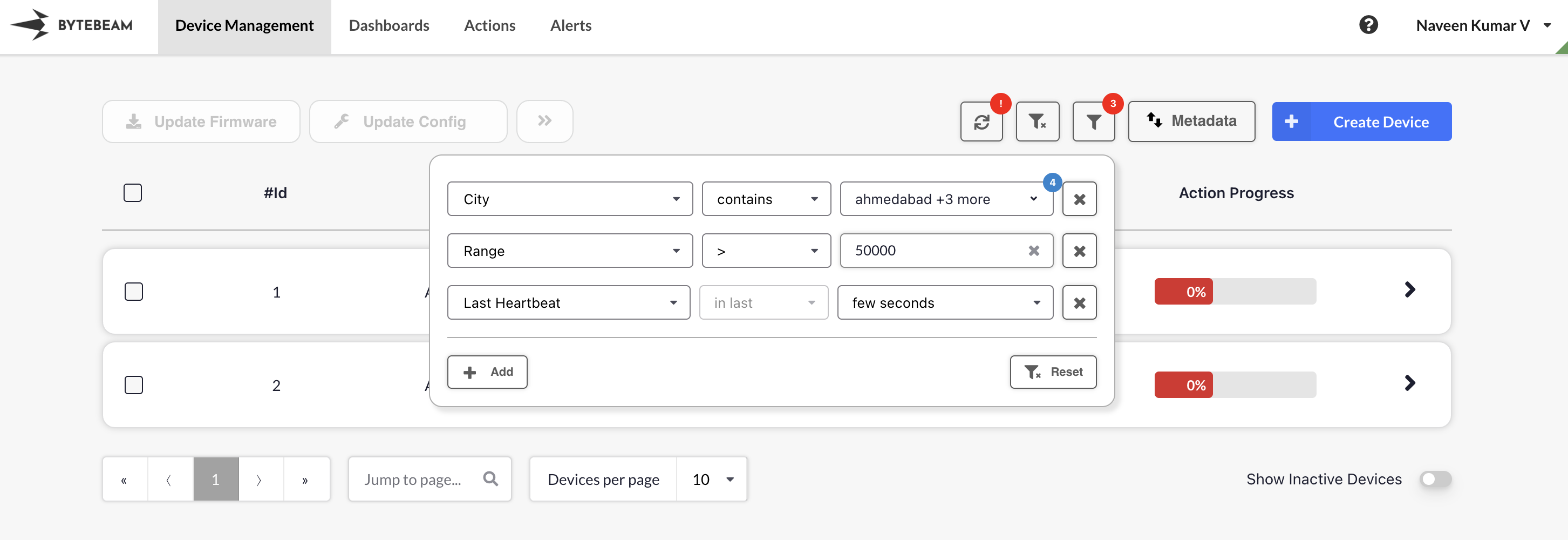 **Multi-Value Metadata Filters**: You can now enter multiple values for metadata keys simultaneously, allowing for more refined device selection.
**Chained Filtering**: Combine multiple filters using parameters such as **Device ID**, **Metadata Keys**, **Device Shadow**, and **Last Heartbeat** to build complex queries with ease.
Filters have been moved into a clean, dropdown modal. This modal allows the following.
* Add multiple filtering conditions.
* Apply various operators and logic.
* Reset filters with a single click.
When **Device Shadow** filters are active, automatic refresh is paused. Use the refresh icon to get the latest data.
These updates significantly improve usability and control, allowing for more dynamic and efficient device management.
## Enhanced Device Selection in Device Management
**Multi-Value Metadata Filters**: You can now enter multiple values for metadata keys simultaneously, allowing for more refined device selection.
**Chained Filtering**: Combine multiple filters using parameters such as **Device ID**, **Metadata Keys**, **Device Shadow**, and **Last Heartbeat** to build complex queries with ease.
Filters have been moved into a clean, dropdown modal. This modal allows the following.
* Add multiple filtering conditions.
* Apply various operators and logic.
* Reset filters with a single click.
When **Device Shadow** filters are active, automatic refresh is paused. Use the refresh icon to get the latest data.
These updates significantly improve usability and control, allowing for more dynamic and efficient device management.
## Enhanced Device Selection in Device Management
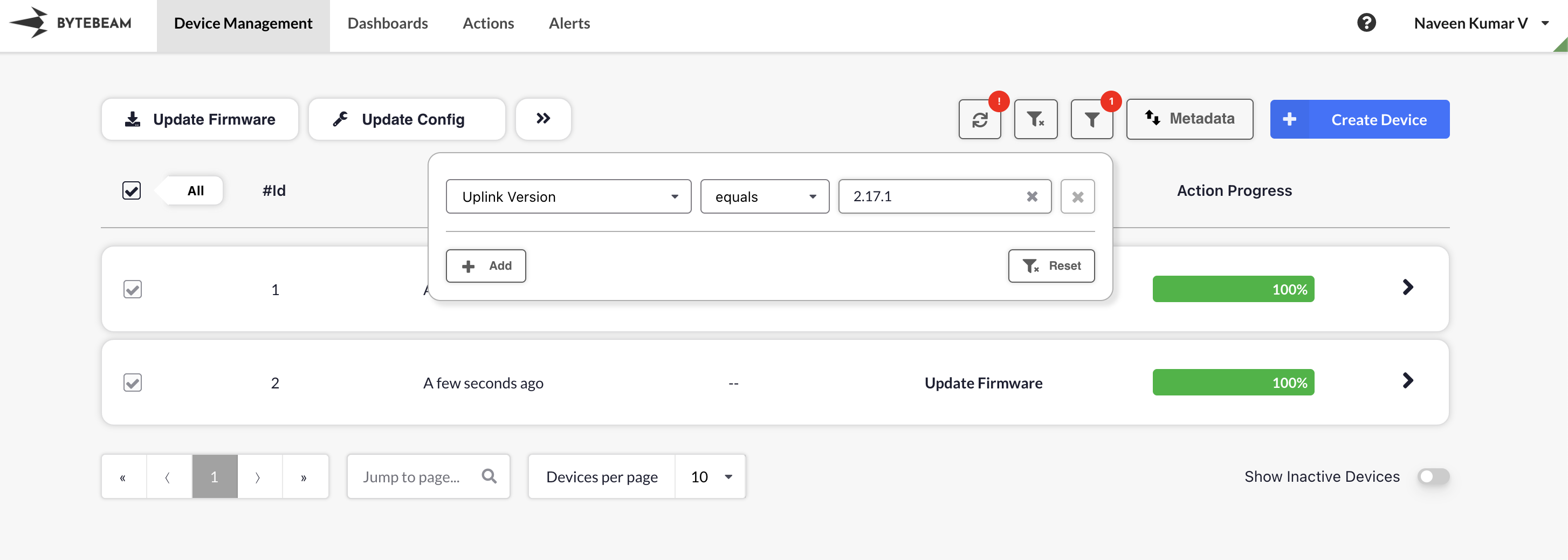 Users can now use **"Select All"** when device shadow filters are applied. The device list is frozen during selection to prevent changes from live data refreshes, making bulk actions like **OTA updates** more reliable.
For example, if you're planning to perform an OTA firmware update for all devices running a specific version, you can:
* Apply the device shadow filter based on the firmware version.
* Use the **"Select All"** checkbox to select all filtered devices.
* Trigger the **"Update Firmware"** action with confidence, knowing the targeted devices remain unchanged during selection.
## Layout Refinement for Cleaner Dashboard Experience
Users can now use **"Select All"** when device shadow filters are applied. The device list is frozen during selection to prevent changes from live data refreshes, making bulk actions like **OTA updates** more reliable.
For example, if you're planning to perform an OTA firmware update for all devices running a specific version, you can:
* Apply the device shadow filter based on the firmware version.
* Use the **"Select All"** checkbox to select all filtered devices.
* Trigger the **"Update Firmware"** action with confidence, knowing the targeted devices remain unchanged during selection.
## Layout Refinement for Cleaner Dashboard Experience
 We’ve made subtle but impactful layout improvements to enhance clarity and usability across the dashboards:
Grouped the **Compare**, **Dashboard History**, and **Settings** options together and converted them into icons for a cleaner look.\
Moved the **filter** section to the left side to better align with natural scanning patterns.\
Relocated the **+ Panel** button below and redesigned it as a Call-to-Action (CTA) for better visibility and intuitive access.
These layout changes aim to make navigation more seamless and actions easier to discover—without affecting existing functionality.
## Bug Fixes & Minor Improvements
* **State update issue in Device Actions**: Resolved a bug where button states did not immediately reflect cancelling, retrying, or completing actions on devices
* **Toggle selection persistence in Inventory**: Toggle selections in the Inventory view will now persist more reliably across interactions
* **Dashboard options hidden for newly created dashboards**: To minimize visual clutter and improve user focus, dashboard options are now initially hidden for new dashboards.
💡 **Need More Insights?**\
Want to better understand how these features work for you? [**Request a Demo**](https://cal.com/kraviteja/bytebeam-101) and schedule a personalized session with our team.
We’ve made subtle but impactful layout improvements to enhance clarity and usability across the dashboards:
Grouped the **Compare**, **Dashboard History**, and **Settings** options together and converted them into icons for a cleaner look.\
Moved the **filter** section to the left side to better align with natural scanning patterns.\
Relocated the **+ Panel** button below and redesigned it as a Call-to-Action (CTA) for better visibility and intuitive access.
These layout changes aim to make navigation more seamless and actions easier to discover—without affecting existing functionality.
## Bug Fixes & Minor Improvements
* **State update issue in Device Actions**: Resolved a bug where button states did not immediately reflect cancelling, retrying, or completing actions on devices
* **Toggle selection persistence in Inventory**: Toggle selections in the Inventory view will now persist more reliably across interactions
* **Dashboard options hidden for newly created dashboards**: To minimize visual clutter and improve user focus, dashboard options are now initially hidden for new dashboards.
💡 **Need More Insights?**\
Want to better understand how these features work for you? [**Request a Demo**](https://cal.com/kraviteja/bytebeam-101) and schedule a personalized session with our team.